
- Nov 17, 2025
3 Ways to Reduce Notion Overwhelm
- Podge Thomas
Are you overwhelmed by Notion, trying to figure out why your Notion doesn't look as the inspiration images on Google and Pinterest?
There's a reason why you keep coming back to Notion despite the frustration but without making some foundational changes, you'll keep hitting the same walls not matter how many features you get the hang of.
Imagine opening your Notion workspace right now.
It's functional - maybe even impressive in spots. You've got databases capturing important information. A few dashboards pulling things together. Some templates you downloaded that looked promising.
But there's this nagging feeling, isn't there? Like you're driving a car that pulls slightly to the left. The car drives just fine, (no engine problems or fluid leaks), but the effort of always pulling slightly to the right is actually just super annoying at this point.
You find yourself starting fresh every few months, convinced that this time you'll get it right. You watch another YouTube tutorial, download another template pack, build another elaborate system. And for a few weeks, it feels good.
Then the drift begins again.
What if I told you that what's missing isn't another template or feature tutorial? What if the small but not insignificant gap between where you are and where you want to be comes down a handful of pretty simple guidelines? An invisible framework that makes everything click?
Let me walk you through what this might look like in practice.
Are you hanging on to databases and templates, just in case?
Element 1: Develop a practice of archiving what you no longer need
Picture Anya opening her Notion on a Monday morning. Her left sidebar is a graveyard of good intentions - abandoned templates, test pages, that "Quick Notes" page from three months ago with exactly two entries. She needs to find her project tracker, but it's buried somewhere in the chaos.
Here's what Anya doesn't realise yet: Her workspace is suffocating under the weight of what she might need someday.
Without built-in maintenance - a systematic way to archive what no longer serves you - every abandoned experiment becomes visual noise. Every unused template becomes a small failure. Every nested page becomes another place for important things to hide.
Anya starts implementing regular archiving. Not deleting (that feels too final), but thoughtfully moving things to a dedicated archive space. She creates categories: "To be deleted", "Might reference later", "Failed experiments worth remembering".
She discovers something surprising: Archiving isn't about getting rid of things. It's about acknowledging what didn't work so you can fully commit to what does.
Now when Anya opens Notion, she sees only what's actively serving her. Her top-level pages are intentional, not accidental. The relief is immediate - like finally cleaning out your junk drawer.
Are you avoiding systems you already set up because they don't actually match your style of working?
Element 2: Shake things up and figure out what really works for you
Three weeks later, Anya notices something else. Even with her cleaner workspace, she keeps avoiding certain pages. That client dashboard she spent hours perfecting? She hasn't opened it in weeks. The content calendar that seemed so logical? She's back to using sticky notes.
This is where the second element reveals itself: Your brain has its own logic and fighting it is exhausting.
Anya starts paying attention to the friction. Why does she avoid that client dashboard? Ah yes, she has to scroll too much to see what matters. The properties she thought she'd need when she created the database are now just noise. The whole thing is organized how she thought she should work rather than how she actually does.
She begins the practice of metacognition - observing her own patterns without judgment. She notices her brain naturally groups things by energy level, not by project. She realises she thinks in webs, not hierarchies. She discovers that visual density makes her anxious, even when all the information is "important."
So she rebuilds - not from scratch, but with intention. Properties that actually matter. Filters that surface only what she needs to see right now. Layouts that match how her brain naturally categorizes information.
The friction dissolves. For the first time, her Notion feels less like a system she's forcing herself to use and more like an extension of how she already thinks.
Are there still things you need to learn about Notion?
Element 3: Skill up and get better at using Notion
Now something interesting starts happening. With less clutter and less friction, Anya has mental space to actually explore what Notion can do. Not in a "productivity hack" way, but in a practical, curious way.
She learns that table view is perfect for data entry, but gallery view makes her contact database feel alive. She discovers that a well-designed dashboard isn't about cramming everything onto one page, it's about creating a space that makes you want to engage with your work.
She creates her first tags database. Nothing fancy, just a simple way to connect ideas across different areas of her work. Suddenly, patterns emerge. That blog post idea connects to three client projects. That book note relates to the workshop she's planning.
Each small skill compounds. The dashboard skills make maintenance easier. The database knowledge reduces friction. The tag system creates helpful connections.
Anya's Notion isn't perfect. It never will be. But it's alive, evolving and genuinely supportive. Most importantly, it feels like hers.
How do you feel about your Notion right now?
If I asked you to open your Notion right now, how would you feel?
Relief and clarity, or mild anxiety about what's lurking in the chaos?
Excited to engage, or weighed down by obligation?
A sense of flow, or constant small frictions?
If you're experiencing chaos, obligation and friction, it might not be about learning all of Notion's features or finding better templates. It might be about implementing these three foundational elements that create the conditions for everything else to work.
Use the simple framework described above:
Archive what you no longer need and keep your workspace breathing
Create an archive page today - don't wait for the "perfect" structure
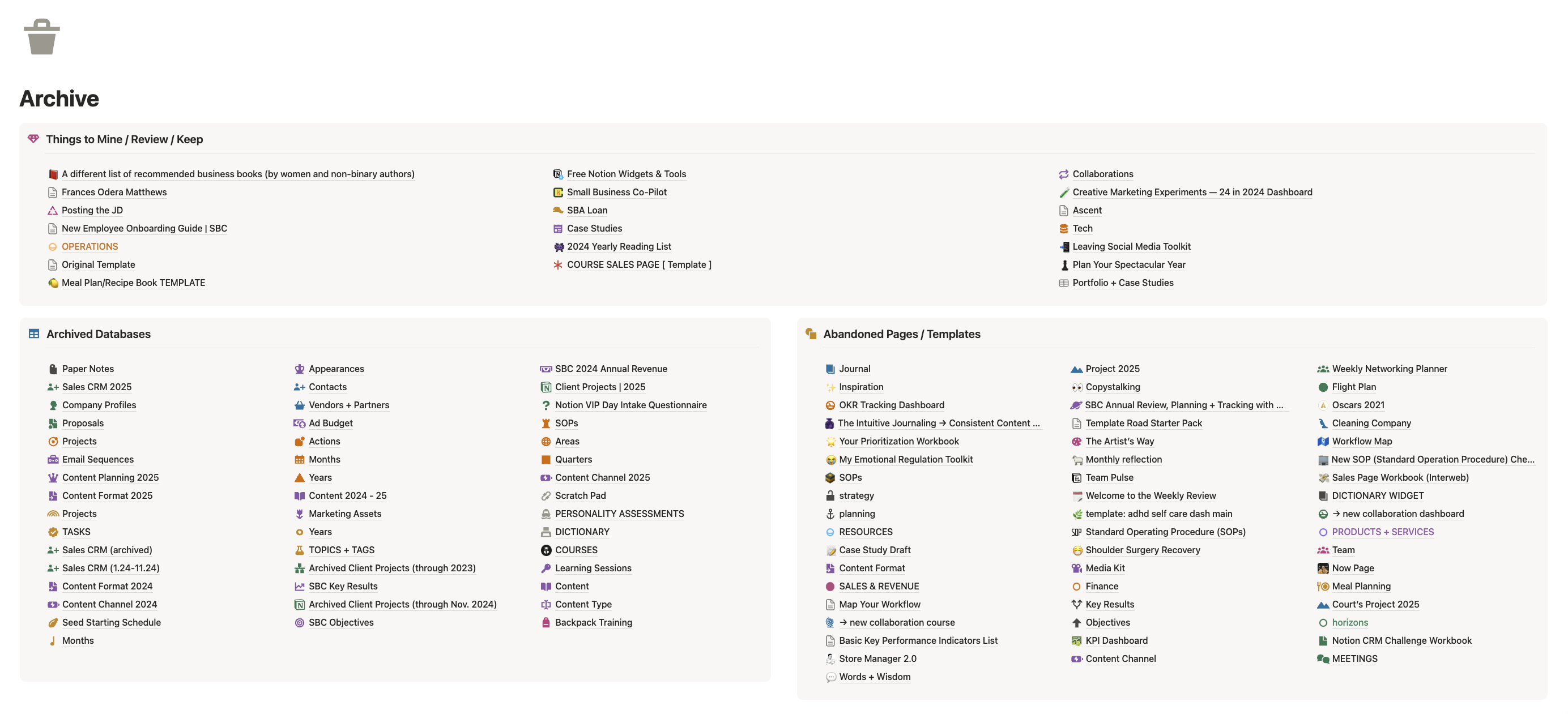
This is my actual Archive page. I haven’t sorted through it yet (much of it was archived in early 2025) but there is some organisation and structure that will help me sift through and delete things when the time is right.
Limit your top-level pages to essential dashboards only
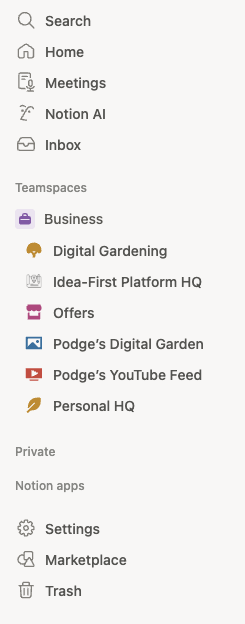
This is my left side bar where I keep my top-level pages (dashboards) to a minimum.
Before adding a new subpage, ask: "What is this related to? Where does it actually belong?"
Add a callout box on existing pages for those one-off items that don't fit into a database
Shake things up and align your systems with your actual thinking
Notice where you feel friction—if you're avoiding a page, there's a reason
Pay attention to how your brain naturally categorizes (by energy? by timeline? by people?)
Check if your layouts match how you think (linear vs. web-like, minimal vs. comprehensive)
Remove properties that seemed important but just create visual noise
Skill Up builds confidence through strategic learning
Become an expert at one database view at a time (tables for entry, galleries for browsing, calendar for planning)
Create a tags database - even a basic one will transform how you see connections
Focus on making dashboards that feel good to use, not just impressive to look at
Remember: each small skill compounds into something bigger
All three work together. Maintenance creates space for clarity. Clarity reveals where friction lives. Reducing friction frees energy for skill building. New skills make maintenance easier. The cycle continues, but now it's lifting you up instead of wearing you down.
FAQs
🗑️ How do I create an archive in Notion?
Start with ease and simplicity by adding a new page in your left-hand navigation bar. Call it "Archive" and give it an obvious icon or emoji like a bin 🗑️. Now you can go through your entire Notion workspace and start dragging things over to that archive page without the anxiety of losing work you may want to revisit.
You could stop there or you could keep going and create some category headings (you could even use callout boxes) and stack your archived assets under those headings. That way, when you need to find something or you want to mine old databases, they'll be easier to find.
🧠 How do I figure out what's not working about my Notion?
The long answer is that it takes time to truly understand what you need to make Notion work for you but on the way, it's all about experimentation. Change your database view, create columns and callout boxes in your dashboards.
Rearranging your Notion isn't a waste of time - it's a necessary part of the learning process. It not only helps you deepen your Notion expertise, it also helps you learn more about you!
🛠️ I want to get better at Notion. Where do I begin?
Of course there are tons of YouTube videos, Notion teachers and step-by-step instructions in Notion's own library but can that feel very overwhelming when you try to think about the enormity of it all. I like to keep things simple, especially if I want to avoid overwhelm so I recommend picking just one thing.
For example, you want to learn how to create beautiful dashboards? Find a free template or an image of a gorgeous dashboard on Pinterest and try to recreate it. Yes, copy it! This is a great way to not only understand the components of a dashboard layout but also how to create it on your own.
Want to go deeper?
I have two on-demand workshops you might like if this blog post was helpful for you:
Notion Clean-Up Day: The Fresh Start You Keep Promising Yourself - a 90 minute recorded workshop that walks you through a full clean up of your Notion workspace
From Blank to Beautiful: Notion Dashboard Workshop - a 90 minute recorded workshop that comes with a Notion worksheet and a recorded bonus session.